Instructions to use zai-org/Glyph with libraries, inference providers, notebooks, and local apps. Follow these links to get started.
- Libraries
- Transformers
How to use zai-org/Glyph with Transformers:
# Use a pipeline as a high-level helper from transformers import pipeline pipe = pipeline("image-text-to-text", model="zai-org/Glyph") messages = [ { "role": "user", "content": [ {"type": "image", "url": "https://huggingface.co/datasets/huggingface/documentation-images/resolve/main/p-blog/candy.JPG"}, {"type": "text", "text": "What animal is on the candy?"} ] }, ] pipe(text=messages)# Load model directly from transformers import AutoProcessor, AutoModelForImageTextToText processor = AutoProcessor.from_pretrained("zai-org/Glyph") model = AutoModelForImageTextToText.from_pretrained("zai-org/Glyph") messages = [ { "role": "user", "content": [ {"type": "image", "url": "https://huggingface.co/datasets/huggingface/documentation-images/resolve/main/p-blog/candy.JPG"}, {"type": "text", "text": "What animal is on the candy?"} ] }, ] inputs = processor.apply_chat_template( messages, add_generation_prompt=True, tokenize=True, return_dict=True, return_tensors="pt", ).to(model.device) outputs = model.generate(**inputs, max_new_tokens=40) print(processor.decode(outputs[0][inputs["input_ids"].shape[-1]:])) - Notebooks
- Google Colab
- Kaggle
- Local Apps
- vLLM
How to use zai-org/Glyph with vLLM:
Install from pip and serve model
# Install vLLM from pip: pip install vllm # Start the vLLM server: vllm serve "zai-org/Glyph" # Call the server using curl (OpenAI-compatible API): curl -X POST "http://localhost:8000/v1/chat/completions" \ -H "Content-Type: application/json" \ --data '{ "model": "zai-org/Glyph", "messages": [ { "role": "user", "content": [ { "type": "text", "text": "Describe this image in one sentence." }, { "type": "image_url", "image_url": { "url": "https://cdn.britannica.com/61/93061-050-99147DCE/Statue-of-Liberty-Island-New-York-Bay.jpg" } } ] } ] }'Use Docker
docker model run hf.co/zai-org/Glyph
- SGLang
How to use zai-org/Glyph with SGLang:
Install from pip and serve model
# Install SGLang from pip: pip install sglang # Start the SGLang server: python3 -m sglang.launch_server \ --model-path "zai-org/Glyph" \ --host 0.0.0.0 \ --port 30000 # Call the server using curl (OpenAI-compatible API): curl -X POST "http://localhost:30000/v1/chat/completions" \ -H "Content-Type: application/json" \ --data '{ "model": "zai-org/Glyph", "messages": [ { "role": "user", "content": [ { "type": "text", "text": "Describe this image in one sentence." }, { "type": "image_url", "image_url": { "url": "https://cdn.britannica.com/61/93061-050-99147DCE/Statue-of-Liberty-Island-New-York-Bay.jpg" } } ] } ] }'Use Docker images
docker run --gpus all \ --shm-size 32g \ -p 30000:30000 \ -v ~/.cache/huggingface:/root/.cache/huggingface \ --env "HF_TOKEN=<secret>" \ --ipc=host \ lmsysorg/sglang:latest \ python3 -m sglang.launch_server \ --model-path "zai-org/Glyph" \ --host 0.0.0.0 \ --port 30000 # Call the server using curl (OpenAI-compatible API): curl -X POST "http://localhost:30000/v1/chat/completions" \ -H "Content-Type: application/json" \ --data '{ "model": "zai-org/Glyph", "messages": [ { "role": "user", "content": [ { "type": "text", "text": "Describe this image in one sentence." }, { "type": "image_url", "image_url": { "url": "https://cdn.britannica.com/61/93061-050-99147DCE/Statue-of-Liberty-Island-New-York-Bay.jpg" } } ] } ] }' - Docker Model Runner
How to use zai-org/Glyph with Docker Model Runner:
docker model run hf.co/zai-org/Glyph
Glyph: Scaling Context Windows via Visual-Text Compression
- Repository: https://github.com/thu-coai/Glyph
- Paper: https://arxiv.org/abs/2510.17800
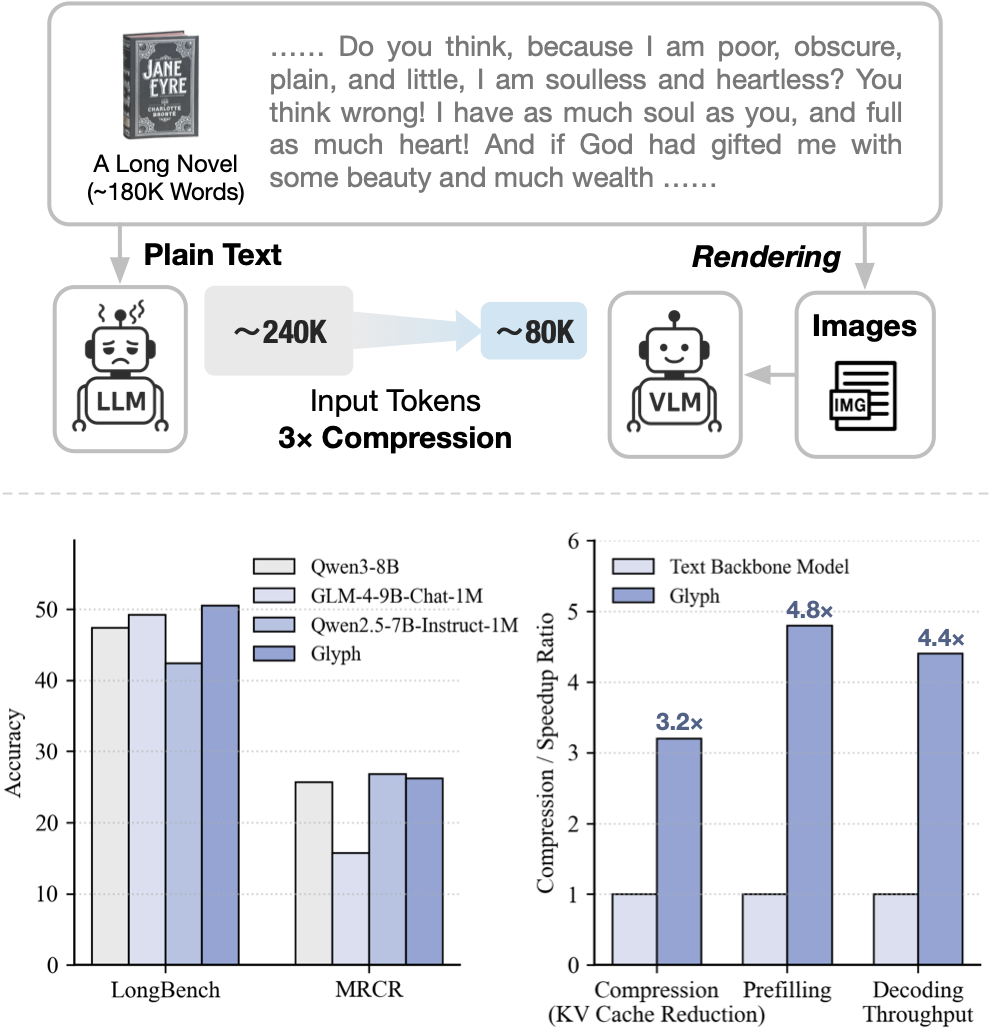
Glyph is a framework for scaling the context length through visual-text compression. Instead of extending token-based context windows, Glyph renders long textual sequences into images and processes them using vision–language models (VLMs). This design transforms the challenge of long-context modeling into a multimodal problem, substantially reducing computational and memory costs while preserving semantic information.
Backbone Model
Our model is built on GLM-4.1V-9B-Base.
Quick Inference
This is a simple example of running single-image inference using the transformers library.
First, install the transformers library:
pip install transformers>=4.57.1
Then, run the following code:
from transformers import AutoProcessor, AutoModelForImageTextToText
import torch
messages = [
{
"role": "user",
"content": [
{
"type": "image",
"url": "https://raw.githubusercontent.com/thu-coai/Glyph/main/assets/Little_Red_Riding_Hood.png"
},
{
"type": "text",
"text": "Who pretended to be Little Red Riding Hood's grandmother"
}
],
}
]
processor = AutoProcessor.from_pretrained("zai-org/Glyph")
model = AutoModelForImageTextToText.from_pretrained(
pretrained_model_name_or_path="zai-org/Glyph",
torch_dtype=torch.bfloat16,
device_map="auto",
)
inputs = processor.apply_chat_template(
messages,
tokenize=True,
add_generation_prompt=True,
return_dict=True,
return_tensors="pt"
).to(model.device)
generated_ids = model.generate(**inputs, max_new_tokens=8192)
output_text = processor.decode(generated_ids[0][inputs["input_ids"].shape[1]:], skip_special_tokens=False)
print(output_text)
See our Github Repo for more detailed usage.
Known Limitations
- Sensitivity to rendering parameters: Glyph’s performance can vary with rendering settings such as resolution, font, and spacing. Since our search procedure adopts a fixed rendering configuration during post-training, the model may not generalize well to unseen or substantially different rendering styles.
- OCR-related challenges: Recognizing fine-grained or rare alphanumeric strings (e.g., UUIDs) remains difficult for visual-language models, especially with ultra-long inputs, sometimes leading to minor character misclassification.
- Limited generalization: The training of Glyph mainly targets long-context understanding, and its capability on broader tasks is yet to be studied.
Citation
If you find our model useful in your work, please cite it with:
@article{cheng2025glyphscalingcontextwindows,
title={Glyph: Scaling Context Windows via Visual-Text Compression},
author={Jiale Cheng and Yusen Liu and Xinyu Zhang and Yulin Fei and Wenyi Hong and Ruiliang Lyu and Weihan Wang and Zhe Su and Xiaotao Gu and Xiao Liu and Yushi Bai and Jie Tang and Hongning Wang and Minlie Huang},
journal={arXiv preprint arXiv:2510.17800},
year={2025}
}
- Downloads last month
- 4,031
Model tree for zai-org/Glyph
Base model
zai-org/GLM-4-9B-0414